

Taking notes has always been essential—whether you’re in class, a meeting, or planning your next project. But now, AI tools are changing how we capture and use information.
Instead of manually writing everything down, AI can record conversations, transcribe them, summarize key points, and organize your notes automatically. It’s faster, easier to search, and way more efficient than flipping through notebooks or scrolling endless docs.
So the question is: should you stick to traditional methods, or switch to AI-powered note taking?
In this guide, we’ll break down the pros and cons of both—and help you figure out which one actually saves you time, boosts recall, and fits your workflow best.
In this article, we’re breaking down the pros, cons, and real-world differences between AI and traditional note taking.
We’ll cover what each method does well, where they fall short, and how they compare when it comes to speed, accuracy, recall, and convenience.
Let’s take a closer look at how these two styles stack up—and which one makes the most sense in 2026.
People Are Stuck Taking Notes the Hard Way
Most people still take notes manually, even if they use digital tools. Whether it’s scribbling on paper, typing in Google Docs, or copying notes from slides, the process is often slow and easy to mess up. You miss things, forget context, and lose track of what matters most.
Here’s what usually happens with traditional notes:
- You start with good intentions but quickly fall behind in fast-paced meetings or lectures.
- Notes become a jumble of bullet points, half-finished thoughts, and unclear abbreviations.
- When you need to review them, they either don’t make sense or you can’t even find them.
- If you’re taking notes by hand, there’s no easy way to back them up or search through them.
And let’s be honest—most people never actually go back and review their notes unless they absolutely have to.
That’s where AI comes in.
Instead of you doing the heavy lifting, AI tools can listen, transcribe, summarise, and organise your notes automatically. You just focus on the conversation, and your notes take care of themselves. It’s not cheating—it’s just smarter.
Traditional Note Taking: What It Gets Right (and Where It Fails)
To be fair, traditional note taking does have its strengths. Writing by hand helps with memory retention. Some people prefer the tactile feel of pen and paper. And in situations where you want to slow down and reflect, manual notes can be useful.
Benefits of traditional note taking:
- Better memory retention: Studies show writing things out helps encode information in your brain more deeply.
- No distractions: With pen and paper, you’re not tempted by notifications, tabs, or multitasking.
- Good for brainstorming: Sketching, doodling, and writing freely can help generate creative ideas.
But there are trade-offs—and they’re big ones.
Limitations of traditional note taking:
- It’s slow: You can’t write as fast as people talk, which means you miss key points.
- It’s disorganized: Notes pile up in random notebooks or scattered files without structure.
- Hard to review: There’s no search. No summaries. Just raw text that you have to read through line by line.
- Zero backup: If you lose your notebook or forget your device, your notes are gone.
Traditional methods were designed for a world without tech. In fast-moving environments—like meetings, lectures, interviews, or client calls—they often fall short.
How AI Note Taking Actually Works
AI note-taking tools have one core goal: take the manual labor out of capturing and organizing information. These tools are designed to handle speech-to-text transcription, summarization, tagging, and content retrieval automatically.
Here’s how AI note taking works in practice:
- Live transcription: The tool listens to conversations, calls, or lectures and converts speech to text in real-time.
- Automatic summarization: AI highlights the key points, action items, and themes—so you don’t have to sift through everything.
- Keyword tagging: Notes are tagged with relevant keywords, making them easier to find later.
- Search functionality: Instead of skimming through pages, just type a term and instantly find the related moment.
- Multi-device sync: Notes are saved to the cloud, so you can access them from your phone, tablet, or desktop.
Many AI tools also work with recordings—so even if you didn’t take notes during the session, you can upload the file and get a detailed summary after.
Some, like NoteGPT, take things further by integrating with video platforms, letting you summarise YouTube videos, podcast episodes, Zoom calls, and more.
The Real-World Benefits of AI Notes
AI doesn’t just make note taking faster—it changes the entire process. Instead of being a passive recorder, it becomes an active assistant that helps you understand and act on what was said.
Here’s what you get with AI note taking:
- Nothing gets missed: AI records everything in real-time, so you don’t lose information because you were thinking or speaking.
- Instant summaries: Want to remember the key takeaways? Let the tool summarise the entire session in a few bullet points.
- Easier reviews: Rather than reading through 5 pages of notes, you can jump straight to highlights.
- Improved collaboration: Share notes instantly with colleagues or clients—even if they weren’t in the meeting.
- Time savings: Spend less time writing, typing, and organizing—and more time using the information.
It also helps people who struggle with focus. For example:
- Students with ADHD can revisit lectures without relying on messy notes.
- Busy professionals can stay present in meetings without multitasking.
- Podcasters, journalists, and creators can automatically turn recordings into transcribed content.
Whether you’re a student, a marketer, a coach, or a team leader—AI makes your notes way more useful, and a lot less stressful.
Side-by-Side Comparison – AI vs Traditional Notes
Let’s break it down side-by-side. Here’s how AI and traditional note taking compare across key areas:
| Feature | Traditional Notes | AI Note Taking |
|---|---|---|
| Speed | Manual, slow writing | Real-time transcription |
| Accuracy | Easy to miss details | Captures everything |
| Reviewability | Raw notes, no summary | Instant summaries & tags |
| Searchability | No search | Keyword search & filters |
| Organisation | Manual folders | Auto-tagged and sorted |
| Collaboration | Not shareable easily | Instant sharing & sync |
| Backup | Risk of loss | Cloud-based & safe |
| Accessibility | Physical access only | Available across devices |
| Learning Support | Passive | Summarised + searchable |
| Cost | Free or low (pen & paper) | AI tools vary: $10–$30/month |
When Traditional Still Wins (Sometimes)
While AI offers plenty of benefits, there are still scenarios where traditional note taking shines. It’s not an either/or decision—sometimes it’s about knowing when to use each.
When traditional is better:
- Deep focus: Writing by hand helps process complex concepts during study sessions.
- Brainstorming: Mind mapping, sketching, and free writing is easier with pen and paper.
- Creativity: Visual thinkers may prefer the freedom of drawing and scribbling ideas.
- Offline environments: When you don’t have internet access or your device, notebooks still work.
Best strategy? Use both.
Take handwritten notes to process thoughts, then upload them or supplement them with AI tools for organizing and recalling later. This hybrid method is powerful—and it’s what many top students and professionals are now doing.
NoteGPT.com: AI Note Taking Built for Real Life
NoteGPT.com is an AI note-taking app designed to make your life easier—whether you’re on iOS, Android, or desktop. It’s built to capture everything, organize it automatically, and let you access it anytime.
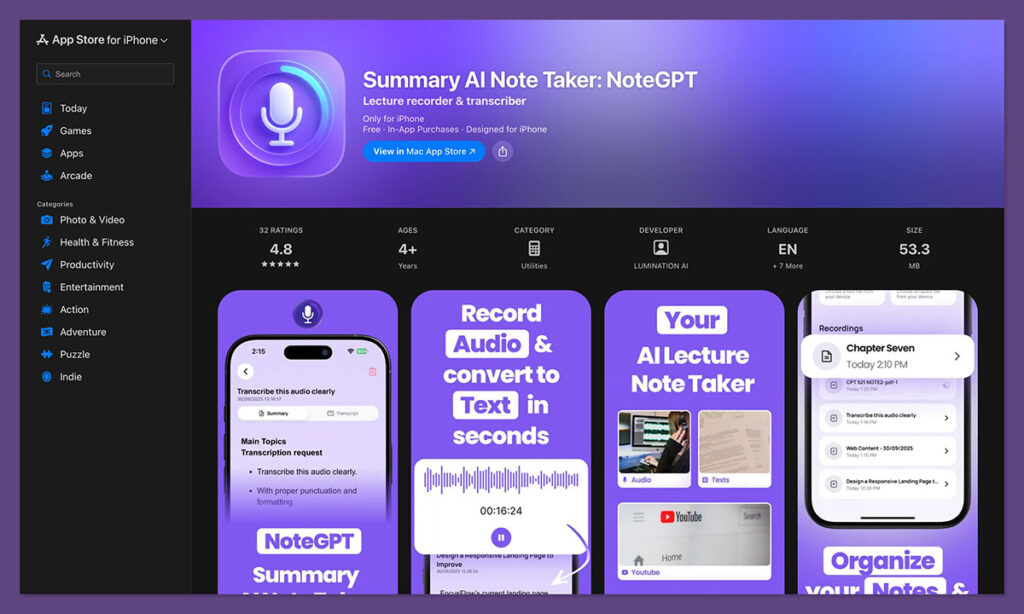
What NoteGPT does:
- Transcribes video, voice, and meetings with high accuracy
- Summarizes long recordings into short, digestible points
- Works across devices with cloud syncing
- Searches your notes instantly using keywords or timestamps
- Lets you save highlights, quotes, and chapters from any video or podcast
You can record inside the app or upload your own files. It’s great for content creators, students, marketers, coaches, and anyone who deals with information overload.
Why users choose NoteGPT:
- Fast transcription & AI summaries
- Clean, simple user interface
- Works with YouTube, Zoom, Meet, audio files
- Available on iOS and Android
- Affordable pricing (starting around $15/month with premium features)
It’s the kind of tool that saves you hours each week—and helps you actually use the content you consume.
Final Thoughts: Combine Both, Win Big
The truth is, AI note taking isn’t here to kill traditional methods—it’s here to make them better.
You don’t have to pick one or the other. You can use pen and paper when you need to slow down, brainstorm, or reflect. But for everyday productivity, AI note taking can do the heavy lifting.
In 2025, information is constant. The real challenge isn’t capturing it—it’s making sense of it.
With tools like NoteGPT, you’re not just taking notes—you’re building a second brain.
And that’s a game-changer.
FAQs About AI Note Taking
Most tools encrypt your data and store it securely in the cloud. Always check the privacy policy of the app you use.
Some features may work offline, but live transcription and syncing usually require an internet connection.
Yes. Apps like NoteGPT can work with Zoom, Google Meet, Microsoft Teams, and more.
Absolutely. NoteGPT lets you paste the link, and it’ll pull a summary plus timestamps.
Both. Students use it to study smarter. Professionals use it to keep up with meetings and projects.
