

Fyxer AI is an AI-powered productivity tool designed to help professionals take back control of their inboxes and meetings.
It integrates directly with Gmail and Outlook, offering features like email triage, meeting transcription, follow-up drafting, and even a searchable assistant for your entire workflow.
After testing Fyxer across real client projects and meetings, I’m here to break down its pricing, features, limitations, and overall value, so you can decide if it’s the right fit for your work setup.
Why You Can Trust This Fyxer Review
To evaluate Fyxer AI, I tested the tool for several weeks across Gmail, Outlook, Zoom, and Google Meet.
I reviewed every feature hands-on, assessed its accuracy, and compared it to competitors like Superhuman, Fireflies.ai, and Microsoft Copilot.
I also analyzed user reviews from Trustpilot, G2, and LinkedIn to see how others experienced it in real-world conditions.
Fyxer AI Pros and Cons
| Category | Details |
|---|---|
| Rating | Excellent – 4.6 out of 5 |
| Best For | Inbox-heavy professionals who want smarter follow-through |
| Free Trial | Yes – 14-day free trial available |
| Paid Plans (USD) | $30/month (Starter) or $50/month (Professional) |
| Support | Help Center, Live Chat, Knowledge Base |
| Integrations | Gmail, Outlook, Zoom, Microsoft Teams, Google Meet, HubSpot (Pro plan only) |
Pros
- AI-written email replies in your tone
- Combines email and meetings into one flow
- Works inside Gmail or Outlook, no new interface
- Reliable notetaker with privacy controls
Cons
- No shared inbox support
- Limited control in Outlook folder categorization
- Redundant if you’re already using Copilot or Gemini
- Meeting bot doesn’t auto-join everything
What I Like About Fyxer AI
Seamless Integration with Existing Workflows
Fyxer doesn’t ask you to change how you work, it fits into your existing tools. I didn’t need to learn a new platform.
Once I connected my Gmail and calendar, it started categorizing emails, drafting replies, and prepping meeting summaries right where I already worked.
Smart Email Drafting That Actually Saves Time
I was impressed by how well Fyxer captured my writing style. It only needed a few hundred past emails to learn my tone.
After that, it generated drafts that sounded like me, concise, friendly, and on-brand. These weren’t generic AI responses. They were contextual, and in most cases, I just made minor edits before sending.
Meeting Recaps That Are Actually Useful
After each meeting, Fyxer delivered a summary, transcript, and follow-up draft. The action items were clear, and it helped me immediately follow up without digging through notes.
It also allows anyone in the meeting to stop the bot, which is a nice touch for privacy.
What I Dislike About Fyxer AI
Outlook Folder Limitations
Fyxer relies on folder naming conventions for categorization, and Outlook users may run into language issues if their setup isn’t in English.
Gmail users won’t face this problem, but Outlook’s quirks might cause misclassifications.
Not Ideal for Shared Inboxes
If you manage a shared mailbox or use collaborative inboxes in support or sales teams, Fyxer won’t support that structure. It’s built for individual inboxes only.
Meeting Bot Limitations
The notetaker works well, but it won’t always auto-join every meeting. For example, if there’s another bot already scheduled to record the same session, Fyxer will back off to avoid conflict.
My Experience With Fyxer AI
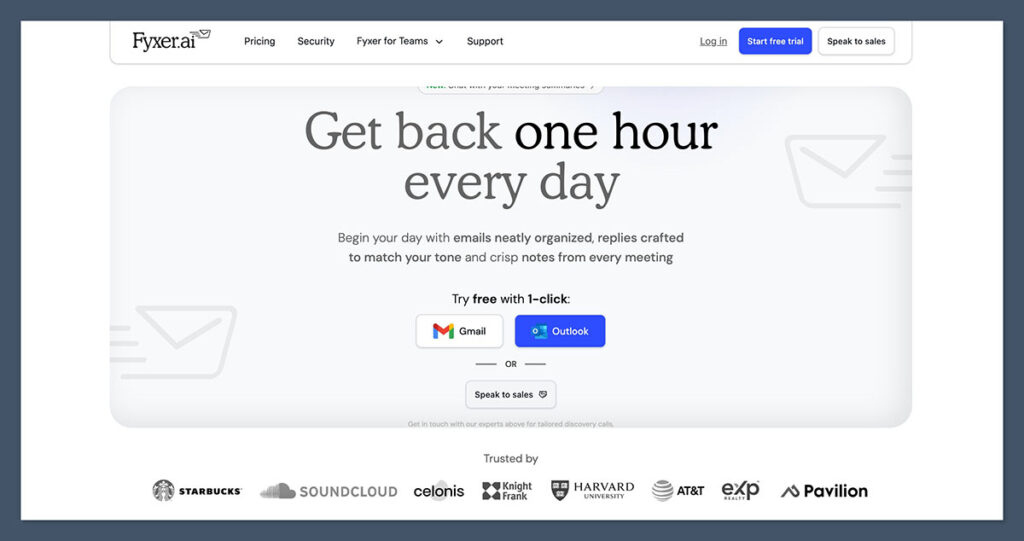
I started with Fyxer’s free trial and connected my Gmail account. The onboarding was simple: no credit card required, just OAuth permissions and a few settings.
It began reading a sample of my recent sent emails and categorizing my inbox right away.
Email Features
Here’s how I used it:
- Email triage: Fyxer filtered urgent messages from noise
- Draft replies: It drafted 2–3 sentence responses in my tone
- Follow-ups: It suggested nudges on unreplied threads
I didn’t feel like it was guessing. It used prior context, threading, and timing cues to determine what to draft and when.
| Email Feature | Included | Notes |
|---|---|---|
| Email categorization | Yes | Separates urgent, low priority, newsletters |
| Draft replies | Yes | Personalized using past sent emails |
| Follow-up suggestions | Yes | Triggers after 2–3 days of no reply |
| Gmail & Outlook support | Yes | Minor limitations in Outlook categorization |
Meeting Features
Fyxer joined Zoom, Google Meet, and Teams calls I scheduled, recorded audio, and returned usable summaries. Here’s what I got after each call:
- A searchable transcript
- A short meeting summary
- Action items by participant
- A follow-up email draft
I liked that I could customize how the bot joined (auto or manual) and that any attendee could pause or remove it.
| Meeting Feature | Included | Notes |
|---|---|---|
| Auto-join support | Limited | Doesn’t join if another bot is scheduled |
| Transcripts & summaries | Yes | Delivered by email after the call |
| Action items | Yes | Based on speaker attribution |
| Follow-up email drafts | Yes | Contextual, editable |
| Participant controls | Yes | Anyone can stop the bot mid-meeting |
Fyxer Chat
This feature lets you ask Fyxer questions like:
- “What was discussed in Monday’s meeting?”
- “When did I last email this client?”
- “Draft an email following up on the pitch call”
You can also upload files and ask questions about them, making it a mini command center for your workday.
Fyxer AI Pricing
Fyxer offers transparent pricing across two tiers and a custom enterprise plan. All plans come with a 14-day free trial.
| Plan | Monthly | Annual Equivalent | Key Features |
|---|---|---|---|
| Starter | $30 | $22.50/month | 1 inbox/calendar, drafts, notetaker, chat assistant |
| Professional | $50 | $37.50/month | Multiple inboxes, HubSpot integration, enhanced triage |
| Enterprise | Custom | Custom | Admin controls, compliance, priority support |
The Starter plan was enough for my solo use, but teams will likely want the Professional or Enterprise tiers.
Security and Privacy
Fyxer claims full enterprise-grade security, and after reviewing their documentation, it’s clear they take this seriously.
Key Certifications:
- SOC 2 Type II
- ISO 27001
Additional Controls:
- Draft-only mode (no auto-send)
- Granular permission control during onboarding
- Data deletion options in the dashboard
If you’re in a regulated industry or working with sensitive client data, I recommend asking for their compliance docs directly. The platform appears secure, but due diligence is always smart.
What Other Users Are Saying
I reviewed dozens of user ratings across G2 and Trustpilot to get a broader sense of Fyxer’s performance.
Trustpilot:
- 4.6 out of 5 from over 50 reviews
- Most praise focused on email time savings and solid summaries
G2:
- 4.8 out of 5 (limited review count)
- Users liked the Microsoft 365 integration and calendar syncing
Real User Comments:
- “Feels like I got an assistant, not a replacement”
- “Drafts are good, but I still need to edit most of them”
- “Can’t use it with shared inboxes, which was a dealbreaker for our team”
Is Fyxer AI Worth It?
After testing Fyxer AI for several weeks, here’s my verdict:
Strong Fit For:
- Professionals buried in email who want fast, tone-matched drafts
- Client-facing roles with frequent meetings and follow-ups
- Solo founders or small teams using Gmail or Outlook daily
Probably Not Ideal For:
- Shared inbox teams or customer support centers
- Users who already rely on Gemini or Copilot for email/meetings
- Anyone looking for full automation or hands-off AI
Fyxer is best when used as a support layer, not a replacement. If you’re looking for speed and control without switching platforms, it’s one of the most thoughtful tools I’ve used.
Final Thoughts
Fyxer AI offers a smart, subtle, and effective way to bring AI into your daily workflow.
It doesn’t try to be everything; it focuses on email and meetings, and it does those things well. If you want to reclaim time in your day while keeping your voice and judgment intact, Fyxer is worth trying.
With transparent pricing, a 14-day free trial, and enterprise-level compliance, it’s a strong option for anyone looking to reduce admin load without losing control.
