

Otter.ai is a well-known AI meeting assistant that handles real-time transcription, AI-generated summaries, and collaborative notes for online and in-person meetings.
Our testing team has evaluated it alongside 10+ competing tools, so I can tell you upfront: Otter is still a solid choice for basic English transcription, but it now trails newer competitors in accuracy, language support, and advanced automation as of 2026.
In this review, I’ll break down Otter’s features, pricing, accuracy, security, and where it sits in the market right now so you can decide if it’s the right fit for your workflow.
Quick Verdict
| Otter.ai | ||
| Best for: basic English meeting transcription | ||
| Good – 3.8 out of 5 | ||
| For individuals and small teams | For live meeting notes | For searchable call archives |
| Free plan available | Paid plans: $8.33 – $20/user/month (billed annually) | ||
Pros
✔️ Easy-to-use interface, especially on mobile
✔️ Decent real-time English transcription
✔️ Solid speaker identification after a few meetings
✔️ Strong collaboration features for teams
Cons
❌ Accuracy no longer best-in-class (~85%)
❌ Very limited language support (mainly English)
❌ Free tier is heavily restricted
❌ Advanced AI workflows and sales tools locked behind Enterprise
Need a quick summary of Otter.ai? Here’s what stood out during testing:
What I Like
✔️ Real-time transcription that works well for clear, English-language meetings with a small number of speakers
✔️ AI meeting summaries with key points, highlights, and time-linked notes you can edit and share with your team
✔️ Speaker identification that gets noticeably better after 2-3 meetings of training, outperforming several rivals in this area
✔️ A genuinely good mobile app for recording and transcribing in-person conversations, lectures, and interviews
What I Dislike
❌ Transcription accuracy hovers around 85%, which means you’ll still need to do manual cleanup on sentence boundaries and misheard words
❌ Language support is narrow: mainly English, with Spanish and French tacked on, and no automatic language detection
❌ The free plan caps you at 300 minutes per month with a 30-minute per-conversation limit, which pushes you toward paid plans quickly
❌ More advanced AI automation, CRM integrations, and sales-specific tools are either locked behind the Enterprise plan or missing entirely
1. What Is Otter.ai and Who Is It For?
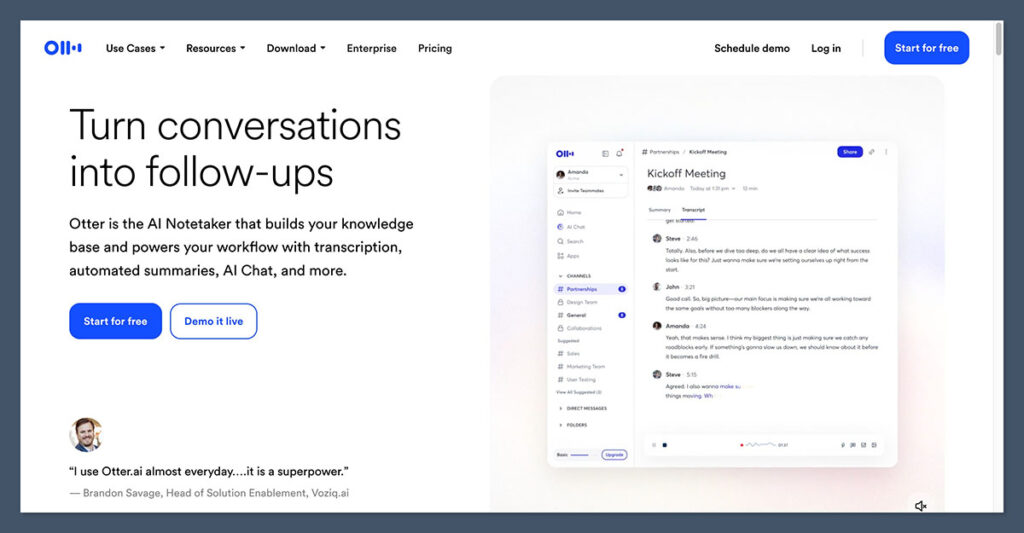
Otter.ai is a cloud-based AI meeting assistant that records your conversations, generates real-time transcription, and produces AI summaries you can share across your team.
It’s aimed at knowledge workers, teams, students, and content creators who sit through a lot of Zoom, Google Meet, or Microsoft Teams calls and want searchable, shareable notes instead of raw recordings.
The key use cases in 2026 come down to four things: live transcription for online meetings and webinars, in-person capture via the mobile app (lectures, interviews, brainstorming sessions), collaborative meeting notes with speaker-attributed action items, and a searchable archive of past calls for sales, research, or content work.
A typical workflow looks like this: connect your calendar, let Otter auto-join your scheduled Zoom meetings, and then have it send the AI summary and action items to your team workspace after each call. It’s simple to set up and works as expected for straightforward use cases.
Author’s Testing Notes
Otter works best when you have a clear use case: you attend a lot of English-language meetings, you want searchable transcripts, and you’re not looking for deep automation or multi-language support. If that describes you, it’s a reliable tool. Where I started running into frustration was when I needed more than the basics, such as automatic language detection, advanced CRM workflows, or tighter accuracy on messy audio with multiple speakers.
2. Core Features in 2026
Real-Time Transcription
Otter’s main selling point is live transcription. During calls and in the app, it shows captions in real time, and independent testing puts its accuracy at roughly 85%. That’s decent, but not outstanding. It performs best when you have clear audio, a small number of speakers, and standard accents. Throw in background noise, heavy accents, or five-plus participants talking over each other, and the quality drops noticeably.
AI Meeting Summaries
After a call, Otter generates a summary with key points, highlights, and time-linked sections. You can edit these, share them with your team, and use them as a quick reference instead of rewatching an entire recording. The summaries are useful but fairly surface-level. Don’t expect them to capture nuance or context-heavy decisions without some manual editing.
Speaker Identification
This is one area where Otter actually stands out. After 2-3 meetings of “training,” it correctly identifies speakers about 85% of the time, which is notably better than many competitors that still regularly mis-attribute speakers. That said, it doesn’t automatically name speakers out of the box. You’ll need to do some manual labeling at the start to get the best results, and occasional mis-attribution still happens.
Collaboration
Teams can comment on transcripts, tag teammates, and share conversations or entire folders organized by project. It’s straightforward and works well for teams that need a shared, searchable record of their meetings.
Integrations
Otter connects with Zoom, Google Meet, Microsoft Teams, and calendar tools to auto-join calls and start capturing notes. The integrations work reliably, but the ecosystem is narrower than what you’ll find with some newer competitors that offer deeper connections to CRM platforms, project management tools, and sales workflows.
Cross-Platform Apps
There are web, desktop, and mobile apps. Multiple reviewers praise the mobile app specifically, and for good reason: it’s well-designed for in-person recording and transcription of lectures, interviews, and meetings where you don’t have a laptop open.
3. How Accurate Is Otter.ai?
Independent testing and competitor reviews place Otter’s accuracy as “good but not top-tier” in 2026. Otter itself claims about 85%, and third-party tests broadly confirm that number, with common issues around sentence boundaries and occasional misheard words that require manual cleanup.
The bigger limitation is language support. Otter mainly handles English, with Spanish and French available but no automatic language detection. If your team works across multiple languages, this is a significant gap compared to newer tools that support 30+ languages with auto-detection.
For single-screen users, there’s also a practical UX issue: viewing both the call and the live transcript at the same time can be awkward, which undermines the “second-screen live caption” use case that Otter promotes.
Author’s Testing Notes
The 85% accuracy figure held up in my testing for clean, two-person English calls. But when I tested with three or more speakers, overlapping dialogue, or non-native English accents, accuracy dropped to a point where I was spending real time on corrections. If transcription accuracy is your top priority, newer tools like Sonix or tl;dv are worth comparing directly.
4. How Much Does Otter.ai Cost?
Otter’s pricing is split between four tiers, ranging from a free plan up to custom Enterprise pricing. Here’s what you’re looking at in 2026 (billed annually):
| Plan | Price (annual billing) | Minutes/Month | Per-Conversation Cap | Best For |
|---|---|---|---|---|
| Basic | Free | 300 | 30 minutes | Casual users trying it out |
| Pro | $8.33/user/month | 1,200 | 90 minutes | Individuals and small teams |
| Business | $20/user/month | 6,000 | 4 hours | Growing teams with admin needs |
| Enterprise | Custom (often $15k–$35k/year) | 6,000+ | 4 hours | Larger orgs needing advanced features |
On paper, the Pro plan at $8.33/month is competitive for an individual user. The Business plan’s 6,000 minutes (100 hours) per month sounds generous, but a 10-person team can burn through that quickly with frequent long meetings. The monthly billing option for Pro jumps to about $16.99, so annual billing is significantly cheaper.
Worth Knowing
The free tier is heavily restricted: 300 minutes per month with a 30-minute cap per conversation and limited storage. It’s fine for a casual test drive, but any serious use will push you to Pro or Business quickly. Otter is competitively priced per seat, but make sure the minute caps actually cover your team’s meeting volume before committing.
Author’s Testing Notes
I’d recommend starting with the Pro plan if you’re an individual or part of a small team. The 1,200-minute monthly allowance and 90-minute per-conversation cap are enough for most people who have a normal meeting schedule. You’ll only need Business if you have a larger team, need admin controls, or regularly run meetings that stretch past 90 minutes.
5. Security, Privacy, and Compliance
Otter uses industry-standard encryption: TLS in transit and AES-256 at rest. It offers two-factor authentication and SSO options on higher-tier plans. The company states it complies with GDPR, supporting data export, deletion on request, and consent controls for EU-based users.
HIPAA and Regulated Use
Historically, Otter wasn’t HIPAA-compliant by default, and earlier reviews noted that healthcare use required a special Business Associate Agreement (BAA) at the Enterprise level. That changed in mid-2025, when Otter announced it had achieved HIPAA compliance with stronger encryption, tighter access controls, audits, and staff training around protected health information.
In practice, healthcare organizations still need to confirm their specific contract and BAA terms. HIPAA support is generally tied to Enterprise-style agreements rather than the free or Pro tiers.
Privacy Note
Unless your contract explicitly opts you out, Otter may use data to improve its AI models. Privacy-sensitive teams should review the data-use terms carefully and negotiate stronger protections if needed.
6. How Otter.ai Compares to Competitors
Otter sits in a crowded market in 2026, and it no longer holds the lead it once did.
Review aggregators and independent reviewers portray it as solid but no longer cutting-edge.
On Capterra, Otter sits around 4.4/5, reflecting generally positive experiences with features and usability. On Trustpilot, its score drops to about 3.2/5, with more polarized opinions often centered on billing, limitations, or support responsiveness.
Competitive reviewers from rival products point out that, compared to newer AI note-takers like tl;dv or Sonix, Otter trails in transcription quality, automatic speaker recognition, language coverage, and AI-driven automation workflows.
| Feature | Otter.ai | Newer Competitors (tl;dv, Sonix, etc.) |
|---|---|---|
| Transcription accuracy | ~85% | Often 90%+ reported |
| Language support | English, Spanish, French | 30+ languages with auto-detection |
| Speaker identification | Strong (after training) | Varies; some match, some trail |
| AI automation workflows | Basic summaries and action items | Deeper CRM/PM integrations |
| Mobile app | Well-reviewed | Mixed quality across competitors |
| Free plan | 300 min/month, 30-min cap | Varies; some offer more generous limits |
7. Otter.ai Review: Should You Use Otter for Your Meeting Notes?
Otter.ai is a mature, reliable AI meeting assistant that does the basics well. If you need real-time English transcription, searchable meeting archives, and a good mobile app for in-person capture, it delivers on those fronts at a reasonable price.
The speaker identification is genuinely strong once trained, and the collaboration features make it easy to share and annotate notes across a team.
Where Otter falls short in 2026 is in the areas that matter most for teams pushing beyond the basics.
The 85% accuracy rate means regular manual cleanup. The limited language support is a dealbreaker for multilingual teams.
And the more advanced AI workflows, sales-specific automation, and deep CRM integrations that newer competitors offer are either locked behind Enterprise pricing or simply absent.
I’d recommend Otter for individuals and small teams who mostly run English-language meetings and want a simple, affordable way to capture and share meeting notes.
If you need best-in-class accuracy, multi-language support, or sophisticated automation, it’s worth looking at alternatives like tl;dv, Sonix, or Fireflies before committing.
Final Verdict
Strengths: Easy to use, mature platform; decent live English transcription; strong speaker diarization once trained; solid mobile app; reasonable per-seat pricing.
Weaknesses: Accuracy and automation no longer best-in-class; limited languages with no auto-detection; restricted free tier; advanced AI workflows and sales tools often locked behind Enterprise or missing altogether.
Bottom line: Otter.ai is a reliable baseline tool for English meeting notes. It’s not the most advanced AI assistant on the market anymore, but it does the fundamentals well at a fair price.
FAQ
Is Otter.ai free?
Yes, Otter offers a free Basic plan, but it’s limited to 300 transcription minutes per month with a 30-minute cap per conversation and restricted storage. Most regular users will need to upgrade to the Pro plan ($8.33/user/month billed annually) or higher.
How accurate is Otter.ai?
Otter claims about 85% transcription accuracy, and independent tests broadly confirm that figure. It works best with clear audio, few speakers, and standard English accents. Accuracy drops with background noise, heavy accents, or multiple overlapping speakers.
Does Otter.ai support languages other than English?
Otter supports English, Spanish, and French, but the experience is heavily optimized for English. There’s no automatic language detection, which puts it behind competitors that offer 30+ languages with auto-detection.
Is Otter.ai HIPAA compliant?
As of mid-2025, Otter announced HIPAA compliance with improved encryption, access controls, and PHI-specific training. However, HIPAA support is generally tied to Enterprise-level agreements, and healthcare organizations need to confirm their specific contract includes a Business Associate Agreement.
Can Otter.ai join meetings automatically?
Yes. Otter integrates with Zoom, Google Meet, Microsoft Teams, and calendar tools to auto-join your scheduled meetings and start capturing notes without manual intervention.
What are the best Otter.ai alternatives?
Popular alternatives in 2026 include tl;dv (praised for broader language support and deeper integrations), Sonix (noted for higher transcription accuracy), and Fireflies.ai (known for CRM and project management integrations). The best choice depends on whether you prioritize accuracy, language support, or automation features.
