

Notta AI is a capable transcription and AI note-taking platform that does its core job well, delivering fast, accurate transcripts and one-click meeting summaries across web, mobile, and even a dedicated hardware recorder.
After spending time testing its features, integrations, and pricing tiers, I can say Notta is a strong pick for anyone whose priority is capturing and summarizing spoken content.
That said, Notta is not without trade-offs.
A restrictive free plan, mixed public ratings, and legitimate privacy concerns around data usage mean it is not the right choice for everyone. In this review, I will walk you through exactly what Notta AI offers, where it delivers, and where it falls short so you can decide whether it fits your workflow.
Notta AI Pros & Cons
Pros
- Excellent transcription accuracy and speed
- Flexible capture: web, mobile, Chrome extension, hardware recorder
- Practical AI summaries and custom templates
- Supports 58 languages
Cons
- Free plan is too limited for serious use
- Privacy concerns around AI training on user data
- Mixed ratings on Trustpilot signal billing and support issues
- Not a full collaboration or meeting OS tool
Need a quick summary of Notta AI? Here is what stood out during testing:
What I Like
- Transcription quality is genuinely impressive for clear speech, and it handles multiple speakers and file uploads reliably
- The Chrome extension and mobile apps reduce friction significantly, letting you start recording from anywhere without opening the full web app
- AI-generated notes pull out entities, decisions, and action items automatically, saving you from manually skimming long transcripts
- The Notta Memo hardware recorder is a real differentiator, offering a dedicated capture device that syncs directly with your Notta account
What I Dislike
- The free tier caps conversations at around 3 minutes in some workflows, making it more of a trial than a usable plan for meeting-heavy users
- A 2026 independent review flags that Notta may use private conversations to train its AI models unless you opt out or negotiate specific terms, which is a deal-breaker for anyone handling sensitive or regulated content
- The gap between a 4.4/5 on G2 and a 2.1/5 on Trustpilot suggests inconsistent experiences, particularly around billing and customer support
- If you need team collaboration features like shared workspaces, task management, or live co-editing, Notta does not go deep enough compared to some competitors
My Experience With Notta AI
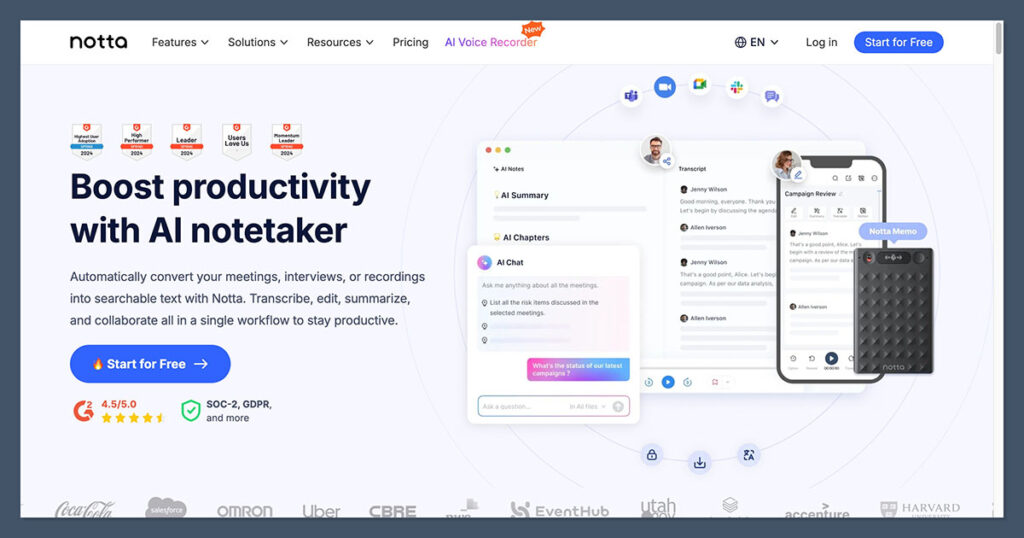
Getting started with Notta is straightforward. The interface is clean and focused on a simple workflow: record, transcribe, summarize, and share. There is no cluttered dashboard or overwhelming onboarding process.
You can jump in from the web app, install the Chrome extension, or download the mobile app and start capturing audio almost immediately.
The Chrome extension is particularly useful. I could start recording a Google Meet call or a YouTube video directly from the browser tab without switching to a separate application. Notta supports recording up to five web pages simultaneously, which is a nice touch if you are monitoring multiple video streams or calls at once.
A typical workflow looked like this: join a meeting, start Notta via the Chrome extension, let it record and transcribe in real time, then generate an AI summary after the session. From there, I could tag key moments, add timestamps and comments, and share snippets with colleagues.
Testing Notes
In my testing, the transcription itself was fast and dependable. Uploading pre-recorded audio files also produced results quickly, and speaker identification worked as expected for clear recordings.
Accuracy was noticeably strong for English speech in low-noise environments, which lines up with what independent reviewers have consistently highlighted as the one thing Notta does “extremely well.”
Accented speech and noisy backgrounds did introduce more errors, but that is standard across the category and not a uniquely Notta problem.
Notta AI’s Core Features
Recording and Transcription
Transcription is the foundation of Notta, and it is clearly where the team has invested the most effort. The platform records and transcribes meetings, calls, and audio in up to 58 languages across browser, desktop, and mobile.
You can upload audio and video files directly and get transcripts with speaker identification, which is useful for reviewing interviews, podcasts, or multi-party calls.
Independent reviewers who have tested Notta extensively in 2025 and 2026 describe the transcription engine as fast, stable, and highly accurate for clear speech. It handles the core job of turning spoken words into searchable text better than many competitors, and that reliability is what keeps users coming back.
AI Notes, Summaries, and Templates
Once you have a transcript, Notta’s AI layer kicks in. The AI Notes feature automatically extracts entities like people, places, dates, and monetary amounts from your transcriptions. It surfaces key points, decisions, and action items so you can get the gist of a meeting without reading the entire transcript.
One-click summaries compress long sessions into concise overviews, highlighting the decisions made and tasks assigned.
For recurring meeting types, you can build custom AI templates that define role-specific outputs. For example, you can create a sales call summary template, a lecture recap format, or a sprint review with structured action items. These templates are practical and mature, not just surface-level AI gimmicks.
Integrations and Extensions
Notta integrates natively with Google Meet for real-time transcription. The Chrome extension handles online meeting recording and can also summarize YouTube videos with a single click, which is a tangible differentiator for content creators, researchers, and students.
For other conferencing platforms like Zoom, Microsoft Teams, and Webex, Notta uses a recorder or bot workflow, or captures system audio depending on the platform and your plan.
The range of supported platforms is solid, though the experience is most seamless on Google Meet where the native integration lives.
Notta Memo Hardware Recorder
One of Notta’s most distinctive features is the Notta Memo, a dedicated handheld AI voice recorder that syncs directly with your Notta account. It transcribes captured audio and phone calls through Notta’s cloud, and reviewers highlight it as more reliable than using a phone for spontaneous ideas, interviews, and in-person meetings.
The Memo is always ready to capture, and its tight integration with the cloud platform means your recordings appear in your Notta workspace automatically.
For journalists, field workers, consultants, and anyone who regularly records outside of a laptop setup, this hardware option is a genuine differentiator that most competitors simply do not offer.
Top Tip
If you do a lot of recording on the go, whether that is client meetings, interviews, or capturing ideas while walking, the Notta Memo paired with the mobile app creates a workflow that is hard to replicate with software-only competitors. It is worth considering if mobile capture is a core part of your routine.
How Much Does Notta AI Cost?
Notta’s pricing is structured across four tiers, ranging from a limited free plan to custom enterprise pricing. Here is what each plan includes:
| Plan | Monthly Price | Annual Price (per month) | Key Features |
|---|---|---|---|
| Free | $0 | $0 | ~120 min/month, ~3 min per conversation cap, basic recording and transcription, limited file uploads (~50/month) |
| Pro | ~$13.49 | ~$8.17 | Advanced transcription limits, AI summaries, exports, more generous minutes |
| Business | ~$27.99/user | ~$16.67/user | Team management, higher or unlimited minutes, business-grade features |
| Enterprise | Custom | Custom | Advanced controls, SSO, tailored limits, dedicated support |
There is also Notta Brain, a separate add-on product priced at about $93.59 per year that includes 8,000 AI credits per month for more advanced AI processing and knowledge workflows.
This is positioned as an upsell for power users who want deeper AI capabilities beyond standard summaries.
Is Notta AI Good Value for Money?
Notta’s Pro plan at around $8.17 per month (billed annually) is competitively priced against rivals like Otter.ai and Fireflies.ai, and it unlocks the features most professionals actually need: extended transcription limits, AI summaries, and export options. For individual users who primarily need transcription and summaries, the Pro plan represents fair value.
The free plan, however, is a different story. The approximately 3-minute per-conversation cap and limited monthly minutes make it functionally a trial rather than a sustainable tier for anyone with regular meetings. If you are evaluating Notta, expect to hit the paywall quickly.
Testing Notes
I recommend starting with the Pro annual plan if you are a solo professional or creator. It covers the essential features without overpaying, and the annual billing discount of over 40% makes a meaningful difference.
You will only need the Business tier if you are managing a team and need shared workspaces or higher minute limits.
Keep in mind that third-party coupon sites frequently advertise large discounts on Notta, but many are unverified or time-limited, so treat those as possible deals rather than guaranteed pricing.
Privacy and Data Usage: The Biggest Concern
This is where Notta gets into uncomfortable territory, and it is the single most important thing to consider before adopting the platform.
A detailed 2026 independent review flags that Notta uses private conversations to train its AI models, calling it the “biggest danger” and the reason the reviewer placed Notta in a personal “no” category.
The concern is that voice and meeting data may be used to improve Notta’s AI unless users explicitly opt out or are on specific plans with negotiated terms.
For content creators, students, or teams using Notta for internal notes and low-risk conversations, this may be an acceptable trade-off. But for anyone in legal, medical, financial, or other regulated industries, this is a serious red flag.
Some competitors offer clearer “no training on your data” guarantees on paid tiers, and that difference matters when client confidentiality is non-negotiable.
Testing Notes
If you handle confidential client conversations, read Notta’s privacy documentation and data-processing terms very carefully before making it your default meeting recorder. Business and enterprise buyers should negotiate data-processing and privacy terms explicitly.
This is not a minor footnote. It should be a central factor in your purchasing decision.
Reputation and Real-User Ratings
Notta’s public ratings tell a split story. On professional review platforms where power users tend to congregate, ratings are solid. On broader consumer platforms, the picture is less flattering.
| Platform | Rating | Review Count (approx.) |
|---|---|---|
| G2 | 4.4 / 5 | ~210 reviews |
| Trustpilot | 2.1 / 5 | ~155 reviews |
| Chrome Web Store | ~3 / 5 | Several dozen |
| Capterra | ~4 / 5 | Very few |
Weighted together, one thorough independent review calculates an overall user score of roughly 3.39 out of 5, which is underwhelming compared to some direct competitors.
The pattern is clear: users focused on core transcription quality tend to rate Notta highly, while the broader consumer base on Trustpilot signals recurring issues with billing, support responsiveness, and UX friction.
How Does Notta AI Compare to Competitors?
Notta occupies a specific niche. It is a transcription-first tool, not a full meeting operating system. Here is how it stacks up against the main alternatives:
| Aspect | Notta AI | Otter.ai / Similar Rivals |
|---|---|---|
| Core strength | High-quality transcription with flexible capture across web, mobile, and the Memo hardware device | Meeting-centric note taking with collaboration and live sharing features |
| AI features | AI notes, summaries, custom templates, YouTube summarization | Live outlines, shared notes, more team-oriented workflows |
| Pricing | Competitive Pro tier but constrained free plan; separate Notta Brain upsell | Slightly pricier in some tiers but more collaborative value for teams |
| Hardware | Optional Notta Memo recorder with tight cloud integration | Typically none; relies on apps and browser extensions only |
| Privacy stance | Criticized for using conversations to train AI unless specific agreements say otherwise | Some competitors offer stricter “no training on paid data” policies |
| Public ratings | Weighted around 3.4/5, with notably weak Trustpilot scores | Often more balanced across platforms, though varies by competitor |
If your priority is raw transcription quality and mobile or hardware-based capture, Notta has a genuine edge.
If you need a team collaboration hub with shared workspaces, task management, and live co-editing, you will likely find more depth with competitors like Otter.ai or Fireflies.ai.
Who Is Notta AI Best For?
Based on testing and the current feature set, Notta fits certain use cases much better than others.
Notta is a good fit if:
- You primarily need fast, accurate transcription and summaries rather than a full collaboration suite
- You do a lot of recording on the go and value the Notta Memo or mobile-first workflows
- You work in relatively low-risk contexts like content creation, education, or internal team notes where AI training on conversations is acceptable
- You want YouTube and browser content capture alongside meeting recording in one tool
Notta is likely a poor fit if:
- You handle highly confidential or regulated conversations and cannot risk data being used to train models
- You want deep team collaboration features like shared workspaces, task management, and live collaborative notes in one platform
- You need a generous free plan that supports heavy meeting volumes without hitting walls quickly
How We Evaluate AI Transcription Tools
To provide a fair and data-backed review, we evaluate AI transcription and meeting note tools across several key areas:
- Transcription Accuracy and Speed (30%) – Testing how reliably the tool converts speech to text across different accents, noise levels, and recording conditions
- AI Features and Summaries (20%) – Evaluating the quality of AI-generated notes, summaries, action items, and custom template capabilities
- Ease of Use and Workflow (15%) – Reviewing the onboarding experience, interface clarity, and how smoothly the tool fits into real daily workflows
- Integrations and Platform Support (15%) – Looking at compatibility with conferencing platforms, browser extensions, mobile apps, and hardware options
- Pricing and Value (10%) – Comparing plans, free tier limitations, and per-minute cost against competing tools
- Privacy and Security (5%) – Assessing data handling policies, opt-out options, and compliance commitments
- Reputation and User Feedback (5%) – Reviewing ratings across G2, Trustpilot, Capterra, and the Chrome Web Store for patterns in real-user experience
Notta AI Review: The Bottom Line
Notta AI is a focused, competent transcription tool that excels at its core job. If you need reliable, fast transcription with practical AI summaries and the flexibility to capture audio from your browser, phone, or a dedicated hardware recorder, Notta delivers.
The Pro plan is reasonably priced, the Chrome extension is genuinely useful, and the custom AI templates add real value for recurring workflows.
But the privacy question hangs over everything. The practice of using conversation data to train AI models is a legitimate concern, and one that should give pause to anyone handling sensitive material.
The free plan’s tight restrictions also mean you are essentially committing to a paid plan from the start.
For creators, students, and teams with low-sensitivity workflows, Notta is a solid choice that competes well on price and transcription quality. For legal, medical, or enterprise buyers, the privacy terms need to be reviewed and negotiated before Notta earns a place in your stack.
