

Coursework is 12.4% of everything people do with Claude. To put that in perspective, education punches about three times above its share of the broader economy, and the single most common education task in the entire dataset is one specific thing: helping students who need extra help with their coursework outside class.
That number comes from the Anthropic Economic Index, a public study built from a large anonymized sample of how people actually use Claude. We pulled the raw data and cut it from the student’s side of the desk. Not “do students use AI” (they clearly do), but the more useful question: how do they use it, and does that look like learning or like offloading the work?
The short version, before the detail:
- Studying is one of the biggest things anyone uses AI for, and it is mostly students driving it, not teachers.
- Most study use is collaborative. Students work back and forth with AI far more than they ask it to just hand over an answer.
- There is one honest exception, and it is writing. That is where the offloading temptation is real and the data shows it.
- The habits the data rewards are the boring, proven ones: review, self-testing, and planning. AI makes them faster, not optional.
Studying is one of the biggest things people use AI for
Anthropic sorts usage into three buckets: work, personal, and coursework. Here is how the data splits.
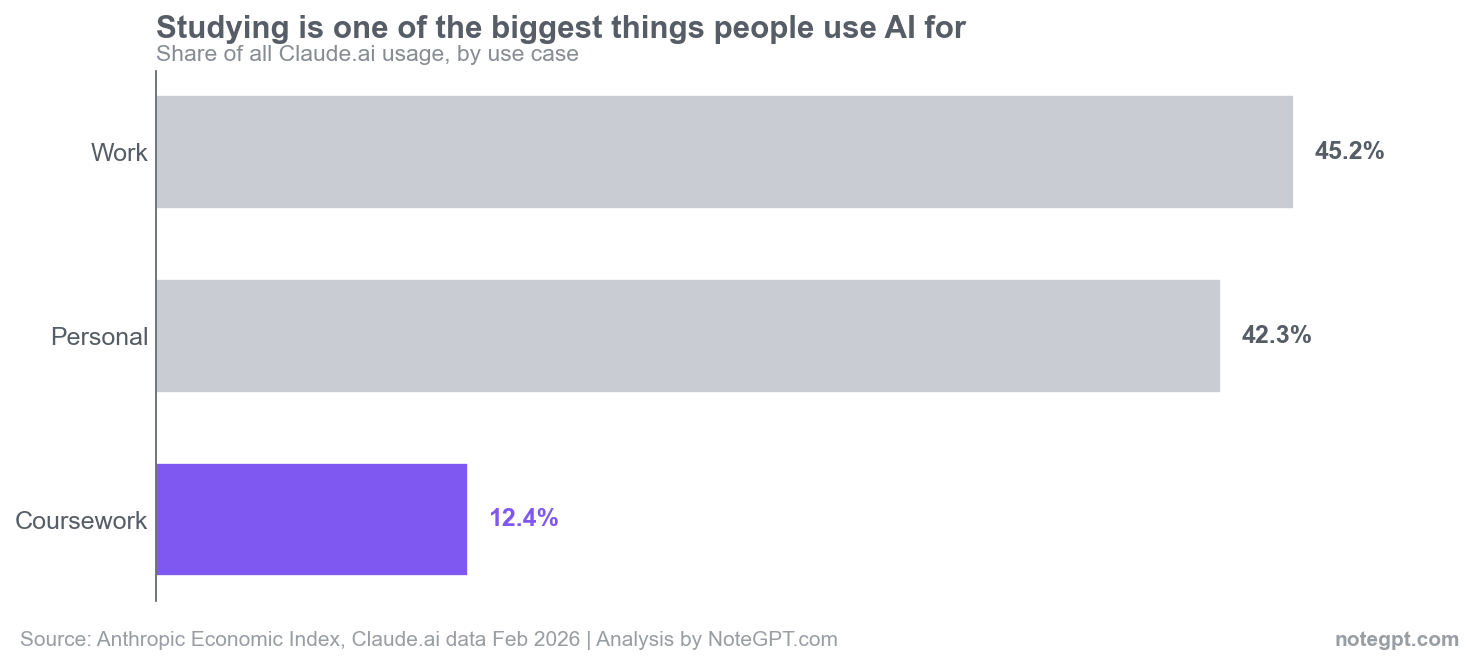
Coursework being one in eight conversations is a lot for a single category, and it has run between roughly 12% and 16% across recent releases, rising and falling with the academic calendar. Education makes up about 4% of the broader economy, so students are using AI at roughly three times the rate you would expect from their economic footprint.
It gets more specific. The most-used education task in the whole dataset is “assist students who need extra help with their coursework outside of class.” When you look at who is actually behind those conversations, 90.8% of them are tagged as coursework, not work and not personal. That is not teachers prepping lessons. That is students, at home, after class, getting unstuck.
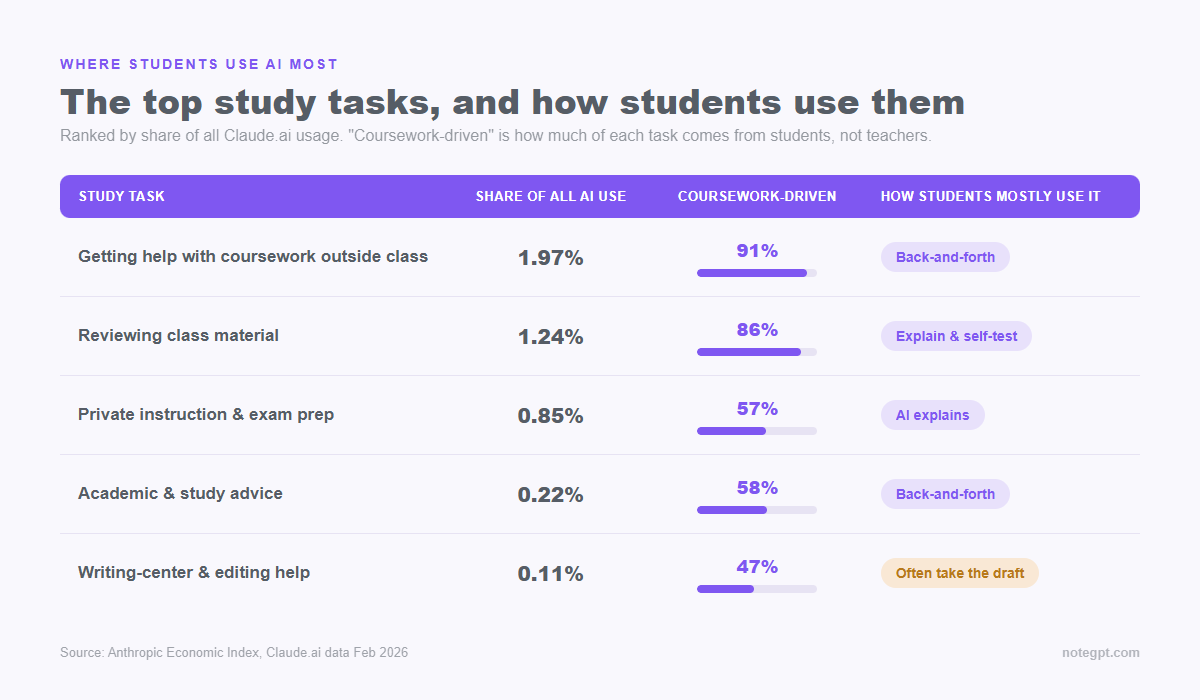
So the headline is settled: AI study help is mainstream, and students themselves are the ones using it. The interesting question is what they do once they open the chat.
Learning with AI versus getting answers from AI
Anthropic also classifies the shape of each conversation. We grouped those shapes into two camps, because for a student that distinction is the whole game.
Learning-oriented use is when you work with the AI. It covers three patterns: back-and-forth iteration (you refine an answer together), learning (the AI explains and you absorb), and feedback loops (you go around a problem more than once). Answer-getting use is the other camp: you give a directive, the AI produces a finished thing, you take it.
Across all of Claude.ai, the split is 59.5% learning-oriented versus 32.6% answer-getting. Now look at that top student task, the coursework-help one that is 90.8% student-driven:
- Back-and-forth iteration: 39%
- Directive (“just do it”): 33.6%
- Learning (AI explains): 15.9%
Add the learning-oriented patterns together and you get 57.7%, against 33.6% for pure answer-getting. When students reach for AI to study, the most common thing they do is argue with it, ask it to explain again, and try the next step themselves.
That is worth sitting with, because it cuts against the panic. The data does not show a generation copying answers. It shows most students using AI the way you would use a patient tutor who never gets tired of the follow-up question. But “most” is not “all,” and the averages hide some real differences. So which kinds of studying lean which way?
The five ways students actually use AI to study
We took the 258 education tasks in the dataset, kept the ones that describe what a learner does (not what an instructor does), and grouped them into five study workflows. Each one carries its own learning-versus-offloading signature.
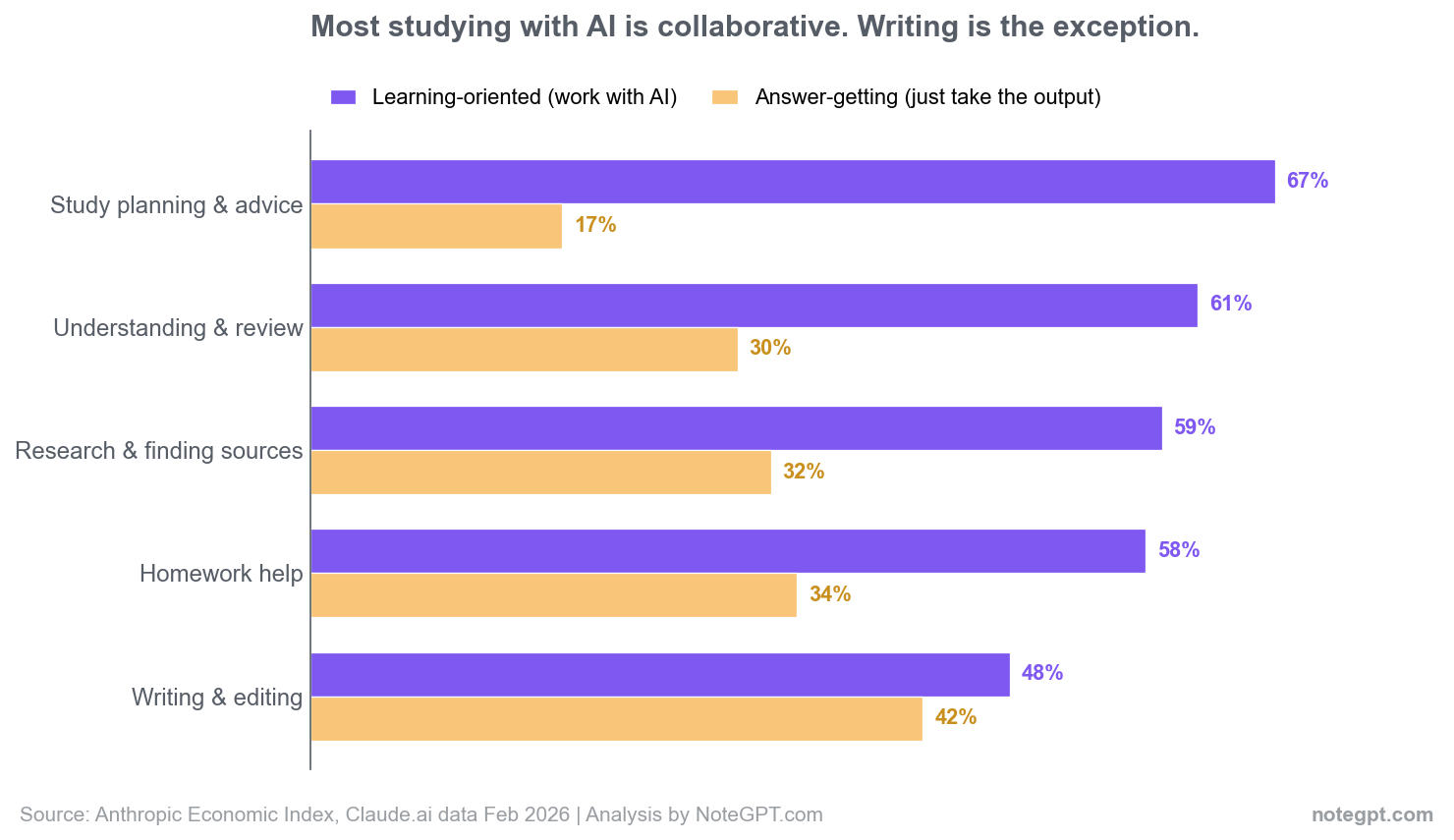
Two workflows dominate the volume. Understanding and reviewing material is the biggest, and it is also one of the most learning-heavy at 61.3%. The task underneath it, “review class material by discussing text and working through problems,” is 86% coursework-driven. This is the read-it-back, explain-this-again, walk-me-through-the-solution kind of studying.
Right behind it sits homework and coursework help, the catch-all for getting unstuck on an assignment. It is slightly more directive (33.6%) than the reviewing workflow, which makes sense: sometimes you are genuinely stuck and you need to see one worked example before you can carry on.
The smaller workflows are revealing. Study planning and academic advice is tiny by volume but the most collaborative of the lot, 66.6% learning-oriented and only 17.4% directive. Almost nobody asks AI to “plan my semester” and walks away. They talk it through. If you have an approach to studying that already works, this is the workflow where AI slots in most naturally.
The honest exception: where AI use looks more like offloading
If the data only ever flattered students, you should not trust it. So here is the part that does not.
Writing and editing help is the least learning-oriented workflow, at 48.3%, and the most answer-getting, at 42.3% directive. It is the only one of the five where collaboration and “just produce it” run almost neck and neck. This is the workflow closest to the thing teachers actually worry about: a finished essay you did not really write.
The data cannot read intent. It cannot tell whether a student asked AI to draft a paragraph and then rewrote it, or pasted the output and moved on. But it can tell you that writing is the place where the shortcut is most tempting and most used, and that should change how you treat it.
The line is not complicated. Using AI to understand an argument, stress-test your reasoning, or turn your own notes into an outline builds the skill. Using it to generate text you do not engage with does not, and it is also the line most academic integrity policies actually care about. A useful habit, borrowed from NoteGPT’s own study guides: when you ask for an outline, tell the model to leave placeholders like [add my own analysis here] so the thinking, and the final words, stay yours.
How to study with AI so you actually learn
The workflows that score highest on learning all share a shape: you stay in the loop. Here is how to copy that on purpose, with prompts you can use today.
Iterate, do not dictate
The top study task is back-and-forth, not one-and-done. Ask the AI to walk you through a problem one step at a time, then try the next step yourself before you let it continue.
Example prompt: “Walk me through this problem one step at a time. After each step, stop and ask me what comes next before you continue. Do not give me the full solution.”
Use it to review, then test yourself
Reviewing material is the single biggest study use, and reviewing is where AI saves the most time: turning a lecture or a chapter into something you can drill. The catch, and NoteGPT’s own guides hammer this, is that reading a clean summary feels like learning when it often is not. Recognition is not recall. So always end on a test, not a summary. Turn your notes into questions and answer them from memory first.
Example prompt: “From these notes, write 10 short-answer questions that test understanding, not just definitions. Do not show the answers. After I attempt them, grade me against the notes and point out exactly where I was vague or wrong.”
This is the workflow a tool like NoteGPT is built for: drop in a video, PDF, or your own messy notes, get back a summary and a set of flashcards and quiz questions you can actually drill, rather than a wall of text you skim once.
Make it explain, then teach it back
The “learning” pattern, where the AI explains and you absorb, is strongest in the understanding workflow. Push it one step further than most students do: after the explanation, explain the idea back in your own words and ask the AI to catch what you got wrong. Teaching is the fastest way to find the holes.
Plan with it
Study planning is the most collaborative use in the whole dataset for a reason: it works. Use AI to break a syllabus into a realistic schedule, then have it pull review questions from material you studied a few days ago. That is spaced repetition without the bookkeeping.
If you want a starting point for which tools fit which job, our roundup of AI productivity apps for students breaks them down by workflow, and there is a deeper guide on how to actually remember what you study.
What this data can and cannot tell you
A few honest limits, because the numbers are only useful if you know what they are not.
- This is Claude usage, not all AI. Patterns on other tools may differ, though the broad shape is likely similar.
- The coursework share moves with the school calendar. It dips over breaks and climbs around exams.
- The task labels come from an occupational database and the matching is imperfect. Some study-shaped work sits in categories we did not count.
- “Learning-oriented” is measured by the shape of the conversation, not by what you retained. A back-and-forth chat is not proof you actually learned. It is just a better bet than copy-paste.
Treat this as a mirror, not a rulebook. It shows what students do. What you should do is still your call, and it still comes down to whether you are using the tool to think more or to think less.
Frequently asked questions
Is using AI to study cheating?
It depends entirely on how you use it, and the data backs that up: most study use is collaborative, not answer-copying. Using AI to understand material, quiz yourself, or plan is studying. Submitting work you did not engage with is the line schools care about. Follow your institution’s policy, and when in doubt, keep the thinking yours.
How do most students actually use AI to study?
The two biggest uses are understanding and reviewing class material, and getting unstuck on homework. Both are mostly back-and-forth, where the student works through the problem with the AI rather than just taking an answer.
Does AI actually help you learn?
It can, when you use it to iterate and test yourself. It helps less, or not at all, when you use it to produce finished work you skim past. The habit that matters is ending on a question you answer from memory, not on a summary you read.
What is the best way to start?
Take one set of notes or one lecture, turn it into ten practice questions, and answer them before you look. Then use AI to grade you and point out the gaps. It is the highest-return habit in the whole list.
Where does this data come from?
The Anthropic Economic Index, an open dataset Anthropic publishes from anonymized Claude usage. The figures here come from the release covering Claude.ai activity in February 2026, and the June 2026 release keeps the same picture: coursework still lands in that 12 to 16 percent band and study use stays majority collaborative. We cut the education slice from the student’s perspective rather than the educator’s.
